写在前面
做好错误监控,将用户使用时的错误上报,可以帮助我们定位解决一些出现的问题。本次主要了解一下几个问题:前端错误的分类,每一种分类的错误捕获方式是什么,如何把这些错误上报?
前端错误分类
- 即时运行错误:代码错误
- 资源加载错误
- 接口错误 即时运行错误的捕获方式:
try..catchwindow.onerror
资源加载错误的捕获方式:
object.onerrorperformance.getEntries()addEventListener("error",function{}, true)error事件捕获(资源加载错误不会冒泡,所以window.onerror不能捕获资源加载错误)。
接口错误捕获方式 所有http请求都是基于xmlHttpRequest或者fetch封装的。所以要捕获全局的接口错误,方法就是封装xmlHttpRequest或者fetch。 这个捕获可以用状态码作为出错条件处理
function axios() {
  if (!window.XMLHttpRequest)
    return
  const xmlhttp = window.XMLHttpRequest
  _oldSend = xmlhttp.prototype.send
  const _handleEvent = function (event) {
    if (event && event.currentTarget && event.currentTarget.status !== 200) {
      // 自定义错误上报
    }
  }
  xmlhttp.prototype.send = function () {
    if (this.addEventListener) {
      this.addEventListener('error', _handleEvent)
      this.addEventListener('load', _handleEvent)
      this.addEventListener('abort', _handleEvent)
    }
    else {
      const _oldStateChange = this.onreadystatechange
      this.onreadystatechange = function (event) {
        if (this.readyState === 4)
          _handleEvent(event)

        _oldStateChange && _oldStateChange.apply(this, arguments)
      }
    }
    return _oldSend.apply(this, arguments)
  }
}
function axios() {
if (!window.fetch)
return
const _oldFetch = window.fetch
window.fetch = function () {
return _oldFetch.apply(this, arguments)
.then((res) => {
if (!res.ok) {
// True if status is HTTP 2xx
// 上报错误
}
return res
})
.catch((error) => {
// 上报错误throw error;
})
}
}跨域的js运行错误捕获错误提示:
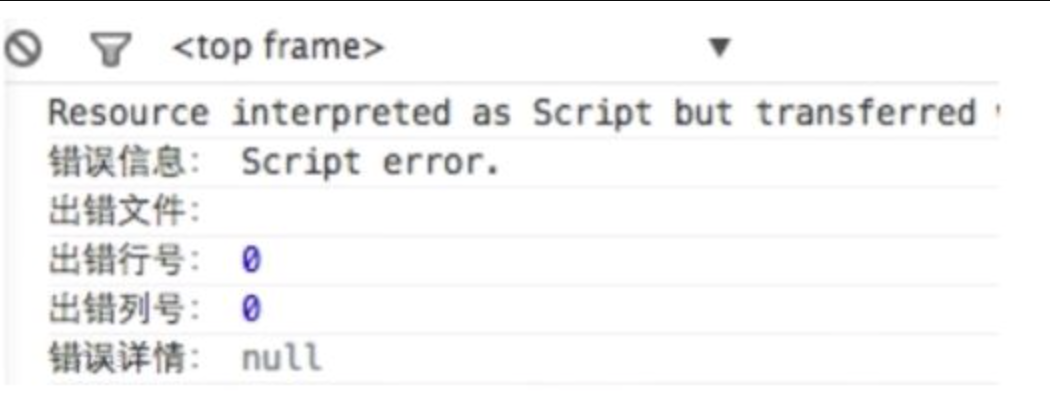
处理方法:
- 在script标签中增加crossorigin属性。
- 设置js资源响应头Access-Control-Allow-Origin。
上报错误的基本原理
- 采用Ajax通信的方式上报。
- 利用Image对象上报
推荐用Image对象上报错误类型,比Ajax方式简单,并且不用借助任何第三方库。
(new Image()).src = 'http://baidu.com/error?err=error'